LightMeter
David QuilesPhotography
4.2182.00 Reviews
- Version
- 1.7.5
- Installs
- 100.00K
- Age Rating
- Everyone
Screenshots
Our Review of LightMeter
 Analysis by Appyee
I often reach for a light meter when a scene looks brighter or darker than it will appear in the finished photograph. A phone can be a handy place to check exposure, and LightMeter is built for photographers who want that reading close at hand. I’d treat it as a practical aid rather than a substitute for learning how light behaves: its value is in helping me make a considered exposure choice, not in choosing the photograph for me.
When connectivity matters less than the moment
A light reading is most useful when I can take it at the point where I’m making a camera decision. If I’m working quickly, I don’t want to stop and search through a general photography app just to get oriented. A dedicated meter can make that part of the process feel more direct. At the same time, the camera and the app are separate tools, so I still have to transfer the reading into my camera rather than assume the two will change settings together.
That distinction is especially useful to remember when comparing phone meters with camera apps that rely on image previews. A preview can help me judge composition and color, but it is not the same as deliberately measuring light. A handheld meter remains a stronger choice when I need a dedicated instrument or a workflow that does not depend on my phone. The phone option makes more sense when convenience and carrying fewer items matter most.
Using it in ordinary shooting situations
For a simple everyday example, imagine I’m photographing a friend beside a bright window. The room may look comfortable to my eyes while the window pulls the camera’s automatic exposure toward the bright background. I can use a meter reading as a reference, then decide whether the face or the window matters more to the picture. That doesn’t remove the creative choice; it makes the trade-off easier to see before I press the shutter.
In changing outdoor light, I would use a reading as a starting point, then check the camera’s result and adjust if the subject or background calls for a different balance. For film, this kind of deliberate routine can be particularly useful because the exposure decision is made before the final image is available for review. For digital shooting, the camera’s own exposure display and test frames are convenient alternatives, but a separate reading can still help when I want to slow down and think through a tricky scene.
Reading the scene, not just the number
The app offers reflective and incident metering, which answer different questions. Reflective measurement concerns light coming back from the subject; incident measurement concerns light falling on it. I wouldn’t treat those readings as interchangeable. A bright surface can influence a reflective reading, while an incident reading can be a useful reference for the light on a subject. Choosing the method that matches what I’m trying to expose is more helpful than simply collecting another number.
A practical habit is to take a moment to identify the subject and the lighting before measuring. If a scene contains a pale wall, dark clothing, and a face, a reflective reading may be swayed by whichever area fills the measurement view. I can avoid blindly trusting it by taking a reading from the important part of the scene and checking whether the result fits my intention. With incident metering, I need to place the meter where the subject’s light is relevant; a reading from a different patch of light may not describe the scene I’m photographing.
That extra thought is a strength for anyone learning exposure, but it can feel like friction when I only want a quick snapshot. In those moments, the camera’s automatic mode is usually faster. The app is more worthwhile when I have time to compare a reading with my camera settings, or when a difficult lighting situation makes the extra check useful.
Getting to Know LightMeter
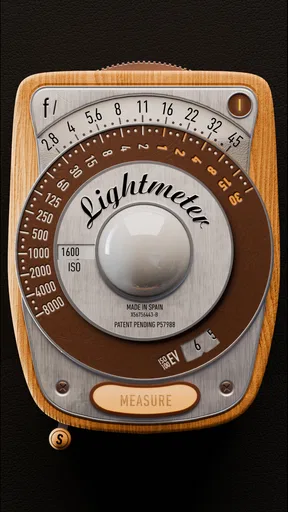
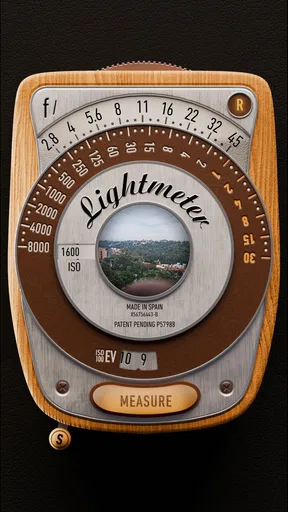
The first thing I noticed about LightMeter is its sleek and intuitive interface. You don’t need to be a tech wizard to navigate through the app, which is a huge plus in my book. From the moment you open it, everything feels straightforward and user-friendly. The app is designed to mimic a traditional light meter, which gives it a nostalgic touch, especially for those who’ve used physical meters before.
Features That Stand Out
Now, let’s talk features. One of the standout features of this app is its accuracy. I’ve tested it in various lighting conditions, and it consistently delivers precise readings. Whether you're in a dimly lit room or out in the blazing sun, you can rely on it to give you the right exposure settings. This accuracy is crucial when you're trying to capture that picture-perfect moment.
Another cool feature is the ability to measure both reflective and incident light. This versatility is something you don’t see in every app. For those who might not be familiar, reflective light measures the light bouncing off your subject, while incident light measures the light falling on it. Having both options gives you the flexibility to adapt to different shooting conditions.
Usability and Performance
I found LightMeter to be quite responsive, with minimal lag, which is essential when you're on the move and need quick readings. The app doesn’t drain your battery either, which is a plus if you’re out shooting for extended periods. Plus, the app supports both Android and iOS, so no matter what device you’re using, LightMeter has got you covered.
The app also integrates well with your camera settings. Once you’ve taken a reading, you can easily adjust your camera’s settings accordingly. This seamless integration saves you time and ensures you’re always ready to capture the moment.
Keeping a steady workflow on the move
When I’m shooting away from home, I want the meter to fit into a routine that is simple enough to repeat: take a reading, note the suggested exposure, set the camera, and check the result when the scene allows. That workflow is useful with a film camera, where the meter and camera are separate, and with a digital camera when I want to make a deliberate exposure rather than rely entirely on automation. It also makes clear why a phone meter is not a remote control for every camera: I remain responsible for entering and judging the settings.
Connectivity can shape the experience around that routine, but I wouldn’t plan a shoot around any assumed network behavior. The core task is measuring light, and I’d check the app in the conditions where I expect to use it before relying on it for a time-sensitive job. If a phone has poor reception in a location, that alone does not tell me how the meter will behave; the sensible approach is to test the exact setup rather than guess. For important work, carrying a dedicated meter or having a camera-based fallback is a reasonable precaution.
There is also a difference between a network problem and a measurement problem. A reading can be available while still being poorly matched to the subject, the direction of light, or the exposure I want. If a result seems surprising, I would first repeat the measurement carefully and compare it with the camera’s meter, rather than assuming connectivity is the cause. That small diagnostic step helps me recover quickly without wasting a series of frames or missing a changing scene.
Why You’ll Love It
If you're like me and sometimes struggle with getting just the right amount of light in your photos, LightMeter is a game-changer. Its ease of use and accuracy make it a valuable tool, whether you're shooting landscapes, portraits, or anything in between. Plus, it’s as portable as your phone, so you’ll never be without it.
What’s more, the app is continuously updated, ensuring you always have the latest features and improvements at your fingertips. The developers seem genuinely committed to enhancing the user experience, which is always a good sign.
Who should choose it—and who may not need it
David Quiles’ photography app is aimed at people who want a meter in their phone for analog or digital work. It has a 4.2 average from around 1.5K ratings, and it has passed 100K installs. Those figures suggest that it has found an audience, but they don’t tell me whether it suits a particular camera or style. I’d focus on whether I actually want to meter manually and whether I’m comfortable transferring a reading myself.
The app costs $2.49, is rated Everyone, and its current version is 1.7.5, with Android 6.0 as the minimum OS. It was released on Nov 24, 2012. I’d consider those practical details before installing, especially if I’m using an older phone. The price is easiest to justify if I expect to use the meter regularly; someone who mostly takes casual snapshots may be better served by the camera’s built-in automatic exposure and need not add another tool.
It is also not my first choice when speed matters more than control. If I’m photographing a fast-moving child, a passing moment, or an event where I can’t pause to measure and set exposure, the camera’s automatic mode is likely the more dependable workflow. For studio or carefully staged work where consistency is critical, a dedicated physical meter may be a better fit. The phone app sits in the middle: more intentional than simply trusting automation, but more portable than carrying another device.
Data-conscious habits and recovery
I’d keep use straightforward and avoid making assumptions about what the app needs beyond the task I’m using it for. Before a planned session, I would open it and check that the controls and readings make sense in a familiar lighting condition. That gives me a chance to notice a problem while there is time to switch to the camera’s meter or another tool. It is a small preparation step, but it is more useful than discovering a confusing setup while the light is changing.
If the app becomes unresponsive or I doubt a reading, I would close and reopen it, take another measurement, and compare that result with my camera. For a high-stakes shot, I would not keep repeating an uncertain reading and hope it becomes correct; I’d use a known fallback. Likewise, I wouldn’t assume that an internet connection improves exposure accuracy. The reading needs to match the light and the method, and the photographer still has to interpret it.
For photographers mindful of mobile data, the safest habit is to treat network use as something to verify on the device rather than infer from the app’s purpose. I wouldn’t rely on a claim that it works in every connectivity condition without testing it myself. If I’m planning to shoot somewhere with limited service, I can check the app beforehand and bring a meter or use the camera’s own exposure tools if the app is not available. That keeps the decision practical without turning connectivity into a distraction from the photograph.
Final Thoughts
In a world where capturing the perfect photo can sometimes feel like a daunting task, LightMeter simplifies the process. It's like having a professional tool right in your pocket, ready to help you take your photography to the next level. Whether you're a seasoned pro or just starting out, this app is definitely worth checking out.
So, if you haven’t already, give LightMeter a shot. I’m pretty sure you’ll find it as indispensable as I do. Happy shooting!
Verdict
Strengths of LightMeter
- Accurate light measurement for photography.
- User-friendly interface with intuitive controls.
- Supports both incident and reflected light.
- Works offline without internet access.
- Customizable settings for different tasks.
Limitations of LightMeter
- Limited features in the free version.
- Occasional discrepancies in low light conditions.
- Some advanced features require in-app purchases.
- Interface may be too simplistic for professionals.
- No integration with other photography apps.
Similar Picks in This Category
View All
Google Photos
Google LLC4.4

Gallery
Google LLC4.2

Picsart AI Photo Editor, Video
PicsArt, Inc.3.9

B612 AI Photo&Video Editor
SNOW Corporation4.1

BeautyPlus-Selfie Photo Editor
PIXOCIAL TECHNOLOGY (SINGAPORE) PTE. LTD.4.5

Remini - AI Photo Enhancer
Bending Spoons4.1
Frequently Asked Questions
What features does LightMeter offer for photographers?
LightMeter is designed for photographers who need precise light readings without carrying a separate device. It offers spot metering, incident metering, and reflective metering options. The app also supports EV compensation, ISO settings, and can be used in full manual mode. It’s a versatile tool for both amateur and professional photographers.
Is LightMeter accurate enough for professional use?
Yes, LightMeter is known for its accuracy and reliability, making it suitable for professional use. The app uses your smartphone’s camera sensor to measure light, and while it may not replace a dedicated light meter for critical tasks, it provides sufficiently precise readings for most photography needs.
Does LightMeter work on both Android and iOS devices?
LightMeter is available on both Android and iOS platforms, ensuring compatibility with a wide range of smartphones. However, performance may vary slightly based on the device’s camera quality and sensor capabilities, so it’s recommended to check user reviews for specific device performance.
Is LightMeter free to use, or does it have in-app purchases?
LightMeter offers a free version with basic functionalities suitable for casual users. However, for advanced features such as spot metering and no ads, a paid version is available. The pricing is reasonable, making the premium features accessible for those who need more comprehensive tools.
How user-friendly is LightMeter for beginners?
LightMeter is designed with an intuitive interface that makes it easy for beginners to navigate. The app includes tutorials and guides to help users understand how to get accurate readings. While it offers advanced features, the basic functions are straightforward, making it approachable for new photographers.
